
Voices With Feelings: Funny, Serious, Love and Sad Narration for Your Video
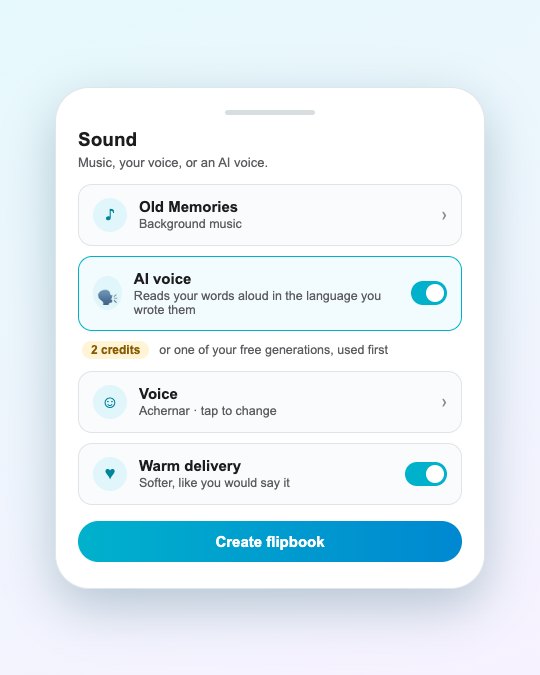
A message read in one flat voice never sounds quite right. ShareGreet's AI voice now has a tone, so the same words can be read with a smile, a softness or some weight.
The nine tones
- Neutral: clear and even.
- Funny: playful, with comic timing.
- Serious: steady and sincere.
- Love: soft and tender.
- Affectionate: warm, like talking to family.
- Sad: slow and heartfelt.
- Motivating: strong and encouraging.
- Respectful: gentle and humble, for elders and teachers.
- Cheerful: bright and happy.
Where to find it
- Create a video: open Voice, music and more and choose a voice tone.
- Cards and flipbooks: under Sound, turn on AI voice and pick a tone. The AI voice reads your words in the language you wrote them.
Match it to what you wrote
If you used Help me write with a feeling, ShareGreet picks the same tone for the voice. A funny shayari is read funny, and a message for your mother who lives far away can be read softly. You can always change the tone yourself. Shayari with emotions shows the writing side.
Tips
- Keep one tone for one message. Switching feelings in the middle sounds odd.
- Short messages carry a tone better than long ones.
- Read it once on your own before you share it, and change the tone if it does not fit.
What it costs
In a story video, the voice is part of the video. For a card or a flipbook, the AI voice uses one of your free generations first, then a small number of credits. Your own recorded voice is always free. See how to add an AI voice for the steps.
Frequently asked questions
Does the tone change the words?
No. The tone only changes how the voice reads them. To change the feeling of the words, use Help me write.
Can I use a tone in any language?
Yes. The voice reads the language you wrote, and the tone applies to it.
Is my own voice better?
A recording of your own voice is free and the most personal. The AI voice is for when you cannot or would rather not record.
Can I hear it before I pay?
The script is free to read and edit. The voice is made when you create the card, flipbook or video.